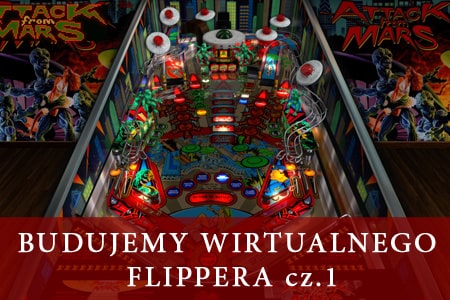
Pinballe czy jak ktoś woli Flippery to automaty, które niezależnie od wieku i płci lubiane są przez wszystkich. Niestety oryginalne stoły są wielkie i drogie, a co za tym idzie dostępne dla nielicznych. Na szczęście dla wielbicieli tego typu maszynek, grupa zapaleńców tworzy wirtualne kopie stołów, które można uruchomić nawet na starszych komputerach, dając im drugie życie na kolejne lata.
Jestem tą samą osobą co na forum 🙂
Już odpowiadałem kilka razy na maila burywilk@yahoo.com i pisałem na twoim "Chomiku"
Założyłem ci konto i wysłałem do ciebie wiadomość na retroemu.pl. To szybki i pewny sposób kontaktu.
tu masz dane do logowania:
Wczoraj do mnie pisałeś. Jak się skontaktowałeś z Burym Wilkiem? Przez chomika i maile nie działa. Jak Możesz podaj mu te dane do logowania na retroemu.pl
login: Bury Wilk
hasło: 09L6v@8wx9IciOVSAMYNF4uc
niech sprawdzi też chomika i spam, bo od 2 dni się do niego dobijam i nic
Seria "Budujemy wirtualnego flippera" będzie się składać z czterech części:
- częśc 1 - instalacja oprogramowania, sprzęt, uruchomienie dwóch typów stołów
- część 2 - instalacja stołów b2s server, dodawenia backglass do stołów,
- czesc 3 - integracja z frontendem. GamesxX
http://mjrnet.org/pinscape/BuildGuideV2/BuildGuide.php?sid=toc&from=title
https://www.nailbuster.com/wikipinup/doku.php?id=baller_installer
emulatory
https://futurepinball.com/ - darmowy
Pinball FX - płatny
visual pinball - darmowy
Pro Pinball - płatny
Pinball Arcade - darmowy płatne stoły
Mini słowniczek
Nik nie lubi
dmd
backglass
Playfield
VPM - Visual PinMAME
vp- visual pinball
Ultra DMD
B2S współpracuje z Visual Pinball, aby wyświetlić animowaną grafikę z tyłu, symulując te same efekty świetlne z tyłu, wyświetlanie wyników i animowane elementy, które można zobaczyć na prawdziwej maszynie . B2S został specjalnie zaprojektowany do konfiguracji szafkowej, w której masz oddzielny monitor dla tylnej szyby.
Przygotowanie Windows
Zanim przejdziemy do instalacji oprogramowania służącego do emulacji
monitor glowny jako stol
Instalacja i konfiguracja Visual Pinball
instalacja oprogramowania
pobrac visual pinball kopleksowy nic nie trzeba dodawać
wejsć i zainstalować pinmame
ten sam ekran setup path
ten sam ekram setup defaul
Jest to plik w którym ustalamy rozdzielczość monitorów i rozmiar i pozycję... struktura tego pliku wugląda tak
klikamy B2S_SetUp.exe
wracamy do c/visula pinbal i klkamy ikonę B2SBackglassServerRegisterApp.exe
jeśli wszystko gra pojawi się taki komunikat:
peraz przechhodzimy do folderu TABLES i edytujemy plik ScreenRes.txt
częśc 1 - instalacja oprogramowania, sprzęt, uruchomienie dwóch typów stołów
część 2 - instalacja stołów b2s server, dodawenia backglass do stołów,
czesc 3 - integracja z frontendem GamesxX
okreslenie pojec
dmd
backglass
Playfield
VPM - Visual PinMAME
vp- visual pinball
przygotowanie windows
monitor glowny jako stol
instalacja oprogramowania
pobrac visual pinball kopleksowy nic nie trzeba dodawać
wejsć i zainstalować pinmame
ten sam ekran setup path
ten sam ekram setup defaul
Jest to plik w którym ustalamy rozdzielczość monitorów i rozmiar i pozycję... struktura tego pliku wugląda tak
klikamy B2S_SetUp.exe
wracamy do c/visula pinbal i klkamy ikonę B2SBackglassServerRegisterApp.exe
jeśli wszystko gra pojawi się taki komunikat:
peraz przechhodzimy do folderu TABLES i edytujemy plik ScreenRes.txt
pobieramy lkik stołu
"obrazek linku"
stoły:
Bad Cats - https://www.vpforums.org/index.php?app=downloads&showfile=5912
Attack From Mars - https://www.vpforums.org/index.php?app=downloads&showfile=6527
opisc po co zmiana nazwy b2s.vbs
link do romów:
https://www.vpforums.org/index.php?app=downloads&showcat=9
https://www.vpforums.org/index.php?app=tutorials&article=136
How do I resize my DMD visual pinball?
Favorite Pinball: Dinner
Right click on DMD and enable Border.
Click and drag DMD to new location. Click and drag on edges to resize.
Right click and hide the border (If the DMD moves back or changes to orig size, try moving it to desired location, shake it a little before hiding the border)
Obracanie wyświetlacza DMD
wbieramy "skrypt" i wyszukujemy :
Controller.Games("ij_l7").Settings.Value("rol")=1
lub
Games(cGameName).Settings.Value("rol") = 0
i zmieniamy na zero
------------------------------------------------------------------------------------------
dodawanie drugiego monitora:
otworzyć stół , kliknąć skrypt i dodać kod :
' new B2S stuff ************************************************
Dim Controller
Set Controller = CreateObject("B2S.Server")
Controller.B2SName = "THREEONEONE_B2S"
Controller.Run()
' **************************************************************
b2s serwer wygenerować plik .res z nazwą stołu
zmienić nazwę pliku .directb2s na nazwę stołu
dodawanie drugiego monitora (wersja 2):
Backglass Design information:
-----------------------------
This backglass was designed to push the limit of the b2s server during the beta test phase and as such
represents a fantasy piece more than a realistic recreation of the original. The majority of my backglasses
will be authored in the same fashion to give the game a bit more life than the original machine. - Dozer316.
Installation:
-------------
- The backglass requires
- .NET Framework 4 installed on your computer. If it is not installed, it can be downloaded from www.microsoft.com:
Download link: http://www.microsoft.com/downloads/en/details.aspx?FamilyID=0a391abd-25c1-4fc0-919f-b21f31ab88b7&displaylang=en
- 'B2S.Server' version 1.0 or higher, installed and configured
Download link: http://www.vpforums.org/index.php?app=downloads&showfile=7426
- The B2S screen settings file "ScreenRes.txt".
Download link for a configuration tool 'B2S ScreenRes Editor': http://www.vpforums.org/index.php?app=downloads&showfile=6268
- Unzip and copy the 'directB2S' file into your Visual Pinball table folder.
Name it like the VP table or like the Hyperpin description tag of the table
- Change one line in the table script:
Search for the following code line
Set Controller = CreateObject("VPinMAME.Controller")
and replace it with
Set Controller = CreateObject("B2S.Server")
Backglass name:
---------------
The backglass file name is based on a correct Hyperpin installation and configuration. The B2S. backglass server will find the correct backglass using the Hyperpin XML file.
If you don't use Hyperpin or don't know how to handle it or there is a problem for the server to find the backglass file, rename the backglass file matching the table name.
By example, if your table is named "MyPinball 1.0 FS.vpt", rename the backglass to "MyPinball 1.0 FS.directB2S".
-----------------------------------------------------------------------------------------------------------------------
dodawanie drugiego monitora (wersja 3):
'Cactus Canyon IPD No. 4445 October, 1998 4 Players 'VPM Version 1.00 by Lord Hiryu December 2008 'Gracias especiales a Pacdude, ya que gran parte del script de esta tabla es suyo, 'así como a JPSalas por usar también parte del script de su Odin Deluxe y facilitarme los archivos de sonido. 'Fecha 13/12/08 Const cController = 3 'Choose Controller: 1-VPM, 2-UVP, 3-B2S
LoadVPM "01120100", "wpc.VBS", 3.26
----------------------------------------------------------------------------------------------------------------------------
Direct Output Framework DOF to warstwa oprogramowania, która umożliwia VP komunikację z urządzeniami zewnętrznymi (LED, cewkami, silnikami itp.) za pośrednictwem szeregu urządzeń sprzętowych, w tym Ledwiz, Pacled(64), urządzeń przekaźnikowych USB i szeregu innych.
Stosowany jest głównie w obudowach, aby zwiększyć immersję symulacji.
Najpierw rejestracja na : https://www.vpforums.org/
oprogramowanie:
Virtual Pinball - zestaw podstawowego oprogramowania:
PinballX - frontend: http://www.gameex.info/forums/files/file/527-pinballx/
częśc 1 - instalacja oprogramowania, sprzęt, uruchomienie dwóch typów stołów
część 2 - instalacja stołów b2s server, dodawenia backglass do stołów,
czesc 3 - integracja z frontendem GamesxX
okreslenie pojec
dmd
backglass
Playfield
VPM - Visual PinMAME
vp- visual pinball
przygotowanie windows
monitor glowny jako stol
instalacja oprogramowania
pobrac visual pinball kopleksowy nic nie trzeba dodawać
wejsć i zainstalować pinmame
ten sam ekran setup path
ten sam ekram setup defaul
Jest to plik w którym ustalamy rozdzielczość monitorów i rozmiar i pozycję... struktura tego pliku wugląda tak
klikamy B2S_SetUp.exe
wracamy do c/visula pinbal i klkamy ikonę B2SBackglassServerRegisterApp.exe
jeśli wszystko gra pojawi się taki komunikat:
peraz przechhodzimy do folderu TABLES i edytujemy plik ScreenRes.txt
pobieramy lkik stołu
"obrazek linku"
stoły:
Bad Cats - https://www.vpforums.org/index.php?app=downloads&showfile=5912
Attack From Mars - https://www.vpforums.org/index.php?app=downloads&showfile=6527
opisc po co zmiana nazwy b2s.vbs
link do romów:
https://www.vpforums.org/index.php?app=downloads&showcat=9
https://www.vpforums.org/index.php?app=tutorials&article=136
How do I resize my DMD visual pinball?
Favorite Pinball: Dinner
Right click on DMD and enable Border.
Click and drag DMD to new location. Click and drag on edges to resize.
Right click and hide the border (If the DMD moves back or changes to orig size, try moving it to desired location, shake it a little before hiding the border)
Obracanie wyświetlacza DMD
wbieramy "skrypt" i wyszukujemy :
Controller.Games("ij_l7").Settings.Value("rol")=1
lub
Games(cGameName).Settings.Value("rol") = 0
i zmieniamy na zero
------------------------------------------------------------------------------------------
dodawanie drugiego monitora:
otworzyć stół , kliknąć skrypt i dodać kod :
' new B2S stuff ************************************************
Dim Controller
Set Controller = CreateObject("B2S.Server")
Controller.B2SName = "THREEONEONE_B2S"
Controller.Run()
' **************************************************************
b2s serwer wygenerować plik .res z nazwą stołu
zmienić nazwę pliku .directb2s na nazwę stołu
dodawanie drugiego monitora (wersja 2):
Backglass Design information:
-----------------------------
This backglass was designed to push the limit of the b2s server during the beta test phase and as such
represents a fantasy piece more than a realistic recreation of the original. The majority of my backglasses
will be authored in the same fashion to give the game a bit more life than the original machine. - Dozer316.
Installation:
-------------
- The backglass requires
- .NET Framework 4 installed on your computer. If it is not installed, it can be downloaded from www.microsoft.com:
Download link: http://www.microsoft.com/downloads/en/details.aspx?FamilyID=0a391abd-25c1-4fc0-919f-b21f31ab88b7&displaylang=en
- 'B2S.Server' version 1.0 or higher, installed and configured
Download link: http://www.vpforums.org/index.php?app=downloads&showfile=7426
- The B2S screen settings file "ScreenRes.txt".
Download link for a configuration tool 'B2S ScreenRes Editor': http://www.vpforums.org/index.php?app=downloads&showfile=6268
- Unzip and copy the 'directB2S' file into your Visual Pinball table folder.
Name it like the VP table or like the Hyperpin description tag of the table
- Change one line in the table script:
Search for the following code line
Set Controller = CreateObject("VPinMAME.Controller")
and replace it with
Set Controller = CreateObject("B2S.Server")
Backglass name:
---------------
The backglass file name is based on a correct Hyperpin installation and configuration. The B2S. backglass server will find the correct backglass using the Hyperpin XML file.
If you don't use Hyperpin or don't know how to handle it or there is a problem for the server to find the backglass file, rename the backglass file matching the table name.
By example, if your table is named "MyPinball 1.0 FS.vpt", rename the backglass to "MyPinball 1.0 FS.directB2S".
-----------------------------------------------------------------------------------------------------------------------
Direct Output Framework DOF to warstwa oprogramowania, która umożliwia VP komunikację z urządzeniami zewnętrznymi (LED, cewkami, silnikami itp.) za pośrednictwem szeregu urządzeń sprzętowych, w tym Ledwiz, Pacled(64), urządzeń przekaźnikowych USB i szeregu innych.
Stosowany jest głównie w obudowach, aby zwiększyć immersję symulacji.
Najpierw rejestracja na : https://www.vpforums.org/
oprogramowanie:
Virtual Pinball - zestaw podstawowego oprogramowania:
PinballX - frontend: http://www.gameex.info/forums/files/file/527-pinballx/
częśc 1 - instalacja oprogramowania, sprzęt, uruchomienie dwóch typów stołów
część 2 - instalacja stołów b2s server, dodawenia backglass do stołów,
czesc 3 - integracja z frontendem GamesxX
okreslenie pojec
dmd
backglass
Playfield
VPM - Visual PinMAME
vp- visual pinball
przygotowanie windows
monitor glowny jako stol
instalacja oprogramowania
pobrac visual pinball kopleksowy nic nie trzeba dodawać
wejsć i zainstalować pinmame
ten sam ekran setup path
ten sam ekram setup defaul
Jest to plik w którym ustalamy rozdzielczość monitorów i rozmiar i pozycję... struktura tego pliku wugląda tak
klikamy B2S_SetUp.exe
wracamy do c/visula pinbal i klkamy ikonę B2SBackglassServerRegisterApp.exe
jeśli wszystko gra pojawi się taki komunikat:
peraz przechhodzimy do folderu TABLES i edytujemy plik ScreenRes.txt
pobieramy lkik stołu
"obrazek linku"
stoły:
Bad Cats - https://www.vpforums.org/index.php?app=downloads&showfile=5912
Attack From Mars - https://www.vpforums.org/index.php?app=downloads&showfile=6527
opisc po co zmiana nazwy b2s.vbs
link do romów:
https://www.vpforums.org/index.php?app=downloads&showcat=9
https://www.vpforums.org/index.php?app=tutorials&article=136
How do I resize my DMD visual pinball?
Favorite Pinball: Dinner
Right click on DMD and enable Border.
Click and drag DMD to new location. Click and drag on edges to resize.
Right click and hide the border (If the DMD moves back or changes to orig size, try moving it to desired location, shake it a little before hiding the border)
Obracanie wyświetlacza DMD
wbieramy "skrypt" i wyszukujemy :
Controller.Games("ij_l7").Settings.Value("rol")=1
lub
Games(cGameName).Settings.Value("rol") = 0
i zmieniamy na zero
------------------------------------------------------------------------------------------
dodawanie drugiego monitora:
otworzyć stół , kliknąć skrypt i dodać kod :
' new B2S stuff ************************************************
Dim Controller
Set Controller = CreateObject("B2S.Server")
Controller.B2SName = "THREEONEONE_B2S"
Controller.Run()
' **************************************************************
b2s serwer wygenerować plik .res z nazwą stołu
zmienić nazwę pliku .directb2s na nazwę stołu
dodawanie drugiego monitora (wersja 2):
Backglass Design information:
-----------------------------
This backglass was designed to push the limit of the b2s server during the beta test phase and as such
represents a fantasy piece more than a realistic recreation of the original. The majority of my backglasses
will be authored in the same fashion to give the game a bit more life than the original machine. - Dozer316.
Installation:
-------------
- The backglass requires
- .NET Framework 4 installed on your computer. If it is not installed, it can be downloaded from www.microsoft.com:
Download link: http://www.microsoft.com/downloads/en/details.aspx?FamilyID=0a391abd-25c1-4fc0-919f-b21f31ab88b7&displaylang=en
- 'B2S.Server' version 1.0 or higher, installed and configured
Download link: http://www.vpforums.org/index.php?app=downloads&showfile=7426
- The B2S screen settings file "ScreenRes.txt".
Download link for a configuration tool 'B2S ScreenRes Editor': http://www.vpforums.org/index.php?app=downloads&showfile=6268
- Unzip and copy the 'directB2S' file into your Visual Pinball table folder.
Name it like the VP table or like the Hyperpin description tag of the table
- Change one line in the table script:
Search for the following code line
Set Controller = CreateObject("VPinMAME.Controller")
and replace it with
Set Controller = CreateObject("B2S.Server")
Backglass name:
---------------
The backglass file name is based on a correct Hyperpin installation and configuration. The B2S. backglass server will find the correct backglass using the Hyperpin XML file.
If you don't use Hyperpin or don't know how to handle it or there is a problem for the server to find the backglass file, rename the backglass file matching the table name.
By example, if your table is named "MyPinball 1.0 FS.vpt", rename the backglass to "MyPinball 1.0 FS.directB2S".
-----------------------------------------------------------------------------------------------------------------------
Direct Output Framework DOF to warstwa oprogramowania, która umożliwia VP komunikację z urządzeniami zewnętrznymi (LED, cewkami, silnikami itp.) za pośrednictwem szeregu urządzeń sprzętowych, w tym Ledwiz, Pacled(64), urządzeń przekaźnikowych USB i szeregu innych.
Stosowany jest głównie w obudowach, aby zwiększyć immersję symulacji.
Najpierw rejestracja na : https://www.vpforums.org/
oprogramowanie:
Virtual Pinball - zestaw podstawowego oprogramowania:
PinballX - frontend: http://www.gameex.info/forums/files/file/527-pinballx/